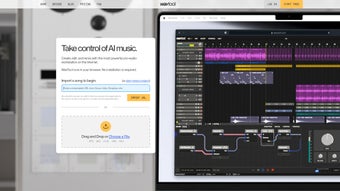

Download Wavtool – AI Music Production, Free Browser‑Based Audio Tool
Overview
Wavtool is a cutting‑edge, AI‑accelerated music and audio production platform that lives entirely in your web browser. Whether you are a bedroom producer, a seasoned composer, or a sound‑design specialist, Wavtool removes the traditional barriers of installing heavy DAWs (Digital Audio Workstations) on a local machine. The service blends powerful audio editing, MIDI sequencing, and real‑time transcription with intelligent assistants such as the Conductor chatbot and the Composer helper.
These tools can generate fresh audio, suggest harmonic progressions, or instantly continue a melodic idea, making writer’s block a thing of the past. The browser‑based nature of Wavtool means you can start a new project on a Windows laptop, switch to a Mac at the office, and finish on an Android tablet without missing a beat. All changes are saved to the cloud, allowing seamless collaboration across devices and even remote teamwork.
Import existing tracks, isolate instruments from mixed audio, or build a brand‑new song from scratch—all with a responsive UI that runs smoothly in modern browsers like Chrome, Edge, Safari, and Firefox. Security and privacy are baked into the platform. Projects are encrypted during transfer and stored on secure servers, while the AI models run in a sandboxed environment to protect your creative data.
Regular updates bring new sound libraries, AI improvements, and workflow enhancements, ensuring that Wavtool stays ahead of the fast‑moving music tech landscape. In short, Wavtool offers a professional‑grade, free, and instantly accessible solution for anyone who wants to create, edit, or remix music without the hassle of traditional software installations.
Core Features of Wavtool
- AI‑Powered Conductor Chatbot: Generate audio clips, MIDI patterns, or entire song sections through natural‑language prompts.
- Composer Assistant: Overcome writer’s block with instant musical continuations, chord suggestions, and melodic ideas.
- Multi‑Track Editing: Arrange, cut, fade, and apply effects to unlimited audio and MIDI tracks directly in the browser.
- Instrument Isolation: Separate vocals, drums, bass, or any instrument from a mixed audio file using AI‑driven source separation.
- Real‑Time Transcription: Convert recorded audio into editable MIDI notes with on‑the‑fly pitch and timing correction.
- Cloud‑Based Project Storage: Save, load, and share projects securely across Windows, macOS, Linux, Android, and iOS devices.
- MIDI Recording & Export: Record live MIDI input, edit performances, and export standard .mid files for use in other DAWs.
- Custom Sound Libraries: Access a growing library of synth patches, drum kits, and sample packs generated by the AI engine.
- Collaboration Mode: Invite teammates to edit the same project simultaneously, with change tracking and version history.
- Regular Free Updates: New features, AI model improvements, and bug fixes are delivered automatically without user intervention.
How to Install and Use Wavtool in Your Browser
Step 1: Access the Platform
Open your preferred modern browser (Chrome ≥ 90, Edge ≥ 90, Safari ≥ 14, or Firefox ≥ 88) and navigate to wavtool.com. No download or installation is required; the entire application runs as a WebAssembly‑powered web app.
Step 2: Create a Free Account
Click “Sign Up” in the top‑right corner. You can register using an email address, Google, or Apple ID. After confirming your email, you’ll be taken to the dashboard where you can create a new project.
Step 3: Start a New Project
Press the “New Project” button, give your session a name, and select a template (e.g., “Empty Session,” “Hip‑Hop Beat,” “Cinematic Score”). The interface loads a multi‑track view with a timeline, mixer, and AI assistant panel.
Step 4: Use the Conductor Chatbot
In the chatbot window, type prompts such as “Create a 4‑bar piano loop in C minor” or “Add a soaring synth lead over the chorus.” The AI returns an audio or MIDI clip that is instantly placed on a new track. You can edit the generated content just like any other clip.
Step 5: Record or Import Audio
To record live instruments or vocals, click the microphone icon, grant the browser access to your audio input, and hit “Record.” For existing files, drag‑and‑drop MP3, WAV, or AIFF files onto the timeline. Wavtool will automatically analyze the audio for tempo and key, enabling seamless integration with AI‑generated elements.
Step 6: Edit, Mix, and Export
Use the built‑in mixer to adjust volume, pan, and apply effects such as EQ, reverb, and compression. When satisfied, click “Export.” You can download a mixed‑down WAV/MP3 file, export stems, or save the project as a cloud‑based Wavtool file for later revisions.
Step 7: Keep Your Work Secure
All projects are saved automatically to the encrypted cloud storage linked to your account. You can also enable two‑factor authentication for added security. If you need to work offline, the “Download Project” button creates a portable ZIP file that can be re‑uploaded later.
With these steps, even a complete beginner can launch a professional‑quality track within minutes, while power users can dive deep into AI‑assisted composition and advanced mixing workflows.
Compatibility, System Requirements, and Pros & Cons
Wavtool is built on web standards and therefore runs on any device that supports modern browsers. Officially supported platforms include:
- Windows 10/11 (Chrome, Edge, Firefox, Safari)
- macOS 12 Monterey and later (Chrome, Safari, Firefox)
- Linux distributions with recent Chromium‑based browsers
- Android 10+ (Chrome mobile)
- iOS 14+ (Safari, Chrome)
The only hard requirement is an active internet connection for AI processing and cloud storage. For offline work, you can download projects and use the local “Export” feature, but AI‑driven features will be unavailable until you reconnect.
Pros
- No Installation Needed: Instantly start producing music without downloading bulky software.
- AI Assistance: Conductor and Composer dramatically speed up idea generation.
- Cross‑Device Sync: Cloud‑based projects keep your work consistent across Windows, Mac, Android, and iOS.
- Free Core Features: All essential tools are available at no cost, with optional premium add‑ons.
- Secure & Private: Encrypted data transfer and storage protect your intellectual property.
Cons
- Dependence on Internet: Real‑time AI functions require a stable connection.
- Browser Performance Limits: Very large projects may tax browser memory compared to native DAWs.
- Limited Third‑Party Plugin Support: No VST/AU hosting; users rely on built‑in effects.
- Learning Curve for AI Tools: Users new to prompt‑based generation may need time to master effective phrasing.
- Audio Interface Integration: Advanced routing options are fewer than in professional desktop DAWs.
FAQ & Final Thoughts
Is Wavtool really free to use?
Yes, the core application, including AI‑driven composition tools, cloud storage, and export functions, is completely free. Premium sound packs and priority AI processing are offered as optional paid upgrades.
Can I import my own VST plugins?
Wavtool does not currently support third‑party VST or AU plugins. All effects and instruments are provided natively by the platform, and new sounds are added regularly via AI‑generated libraries.
How secure is my music data in the cloud?
Projects are encrypted with TLS during transfer and stored on servers that comply with industry‑standard security protocols. You can also enable two‑factor authentication for added account protection.
Does Wavtool work on low‑end hardware?
Because the heavy AI processing runs on remote servers, the local hardware only needs to handle basic audio playback and UI rendering. Even modest laptops or tablets can run Wavtool smoothly, provided they have a recent browser.
Can I collaborate with other musicians in real time?
Yes. Wavtool’s Collaboration Mode lets multiple users edit the same project simultaneously, with live cursor indicators and automatic versioning to prevent conflicts.
Wavtool is a groundbreaking step forward for browser‑based music creation. Its AI assistants dramatically reduce the time it takes to turn a vague idea into a polished track, while the cloud‑first architecture ensures you can work wherever inspiration strikes. The free tier already offers a professional set of features, and the platform’s focus on security makes it a trustworthy choice for serious musicians. While it lacks the deep plugin ecosystem of traditional DAWs, its simplicity, cross‑device flexibility, and powerful AI tools make it an essential addition to any modern producer’s toolkit.
Ready to unleash your creativity? Click the button below to sign up for a free Wavtool account, start a new project, and experience AI‑enhanced music production without ever installing software.



.png)



